 JSON All-in-One

Choose a JSON export format
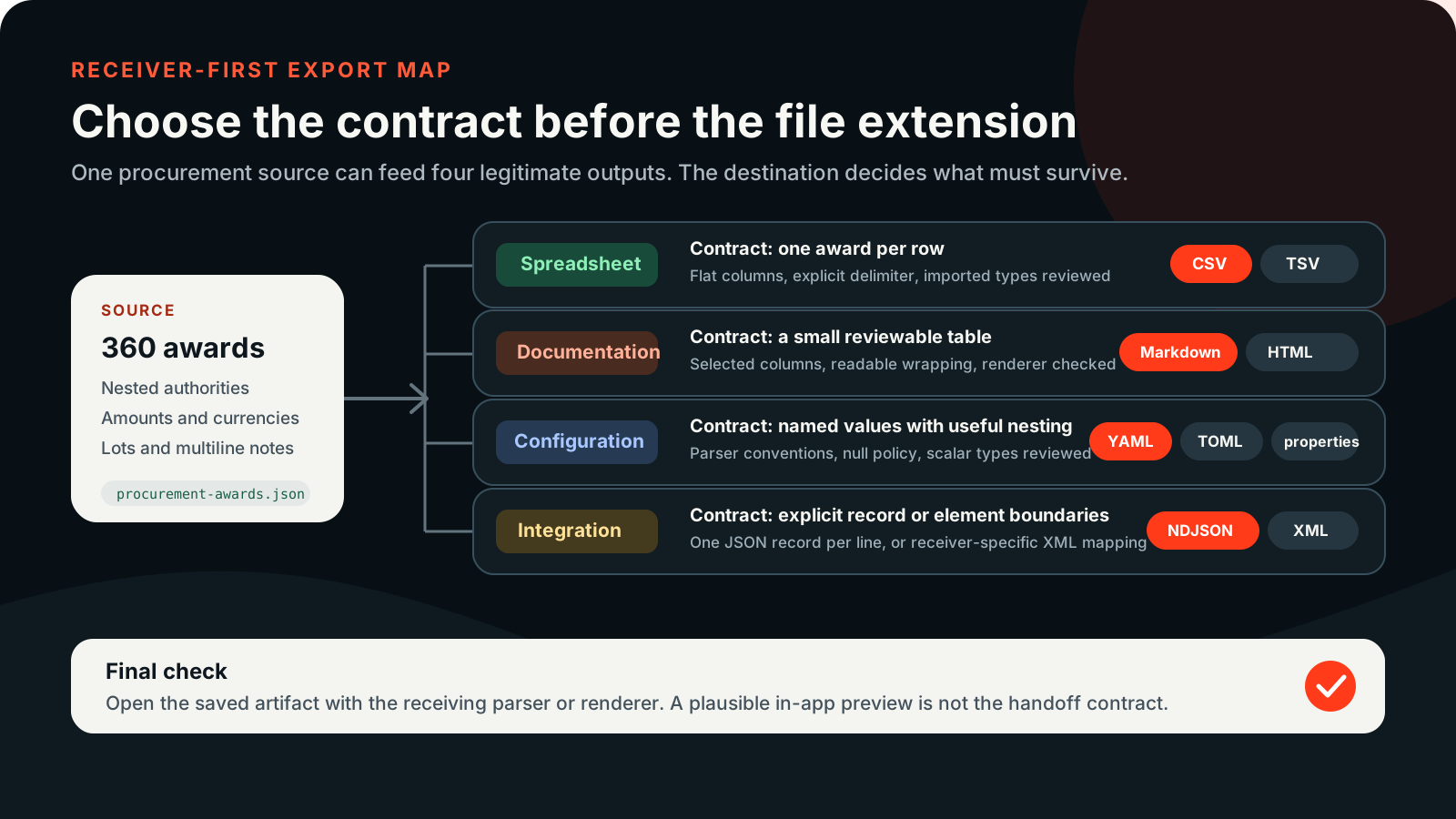
The best JSON export format is the one your receiving system can read without guessing. A spreadsheet wants rows and columns, a configuration file wants predictable keys, an integration may need XML, and a log pipeline usually wants one record per line.
Choose the output format for the system that will read it. JSON All-in-One exports locally from the source document or a shaped result; the sections below explain the mapping decisions and link to a focused guide for each format.
Start with the destination
Ask where the output will go first. If the next stop is Excel, Sheets, a BI import, or a database loader, use CSV or TSV and review column types during import. If the next stop is a README, issue, or report, a Markdown table or HTML table is easier to read. If the output becomes configuration, YAML, TOML, or .properties may fit better, but only after you check that the receiving application expects that structure.
JSON can nest objects, arrays, strings, numbers, booleans, and nulls in one tree. Most export formats cannot preserve that entire model without choices. The useful question is not whether a format is universally lossless. The useful question is whether the mapped output matches the job you are handing off.
Export format comparison
| Format | Best for | Watch for | Guide |
|---|---|---|---|
| CSV | Comma-delimited spreadsheet and database handoffs | Nested paths, missing cells, spreadsheet type coercion, formula-like prefixes | Nested JSON to CSV |
| TSV | Tab-delimited spreadsheet imports where commas are common in values | Tabs/newlines inside cells, identifier columns, formula-like prefixes | JSON to TSV |
| YAML | Readable configuration or reviewable nested data | YAML version differences, quoted scalars, no recovery of comments or anchors | JSON to YAML |
| TOML | Configuration that expects tables and arrays of tables | No null value; mixed arrays are valid TOML 1.0 but restricted by this exporter | JSON to TOML |
| .properties | Flat key/value configuration | Dots, array indexes, escaping, and application-specific binding | JSON to .properties |
| XML | Hierarchical interchange with XML consumers | Root element, element names, repeated values, and schema expectations | JSON to XML |
| Markdown table | README, issue, and documentation tables | Wide rows, pipe escaping, and multiline readability | JSON to Markdown table |
| HTML table | Shareable table reports opened in a browser | Saved artifact behavior, escaping, sorting, and mapping differences from CSV | JSON to HTML table |
| NDJSON / JSONL | Line-oriented pipelines and record-by-record processing | Every line must be an independently parseable JSON value | JSON array to NDJSON |
One input can have several useful outputs
The same source can be exported in different ways depending on what you need next. When the useful rows are wrapped inside a root object, make the selection explicit first. For a table export, the nested fields become columns such as customer.plan. For NDJSON, the shaped array becomes separate records.
{
  "orders": [
    {"order_id":"A-1001","customer":{"name":"Mina Lee","plan":"pro"},"amount":"0012.50","status":"paid"},
    {"order_id":"A-1002","customer":{"name":"Noah Park","plan":"free"},"amount":"-12","status":null}
  ]
}.orders[
{"order_id":"A-1001","customer":{"name":"Mina Lee","plan":"pro"},"amount":"0012.50","status":"paid"},
{"order_id":"A-1002","customer":{"name":"Noah Park","plan":"free"},"amount":"-12","status":null}
]order_id,customer.name,customer.plan,amount,status
A-1001,Mina Lee,pro,0012.50,paid
A-1002,Noah Park,free,"'-12",null
{"order_id":"A-1001","customer":{"name":"Mina Lee","plan":"pro"},"amount":"0012.50","status":"paid"}
{"order_id":"A-1002","customer":{"name":"Noah Park","plan":"free"},"amount":"-12","status":null}
Export the source or a shaped result
Before exporting, decide whether you want the whole document or a smaller result. A JQ query can project only the fields you need, filter records, rename columns, or build an array that is easier to hand off. That is usually better than exporting a huge source and cleaning it later.
For row-based exports, start from an array when possible. CSV, TSV, Markdown table, HTML table, and NDJSON all depend on a row or record model. If your source is a nested object with the records buried inside, shape the desired array first with a query, then export that result.
Common export pitfalls
- CSV and TSV are text formats. Spreadsheet applications may still convert values such as long IDs, dates, or negative-looking strings unless you choose deliberate import types.
- Formula-like CSV/TSV cells can be apostrophe-prefixed for safety. That includes cells beginning with
=,+,-,@, a tab, or a newline, so check negative numeric text before claiming exact spreadsheet handoff. - TOML has no null value. Mixed-type arrays are allowed by TOML 1.0, but the current exporter requires matching array value types; the TOML guide explains that separate limitation.
- Markdown table output is for tables, not arbitrary prose generation. Use HTML or CSV when rows are wide or multiline content must remain easier to inspect.
- HTML table export creates a report artifact, not a general web application. Verify the saved file, not only the workspace preview.
- NDJSON and JSONL require one complete JSON value per nonempty line. Source formatting line breaks are not record boundaries.
Export guides
Choose the detailed workflow that matches your receiving system. Each guide includes a copyable input and target output, plus the caveats that matter for that format.
Keep going
Convert nested JSON to CSV without uploading it
Export nested JSON to CSV locally, shape nested fields into deliberate columns, and avoid spreadsheet surprises with IDs, nulls, and formula-like values.

Convert JSON to TSV for spreadsheet handoffs
Need a local JSON to TSV workflow? This guide covers nested columns, tabs and newlines inside cells, plus the import settings worth checking in a spreadsheet.
Convert JSON to YAML for readable configuration
Export JSON to YAML locally with clear examples for nesting, quoted strings, booleans, nulls, and configuration handoff limits.
Convert JSON to TOML for configuration files
Turn JSON configuration into TOML tables, arrays, and arrays of tables while understanding null, root, and parser limitations.
Convert nested JSON to .properties
Convert nested JSON to a .properties file, then check the flattened keys, array indexes, escaped values, and the rules of the receiving application.
Convert JSON to XML with a clear mapping
Convert JSON to XML locally and see what happens to the root, arrays, escaped text, invalid element names, nulls, and schema-specific expectations.
Convert JSON to a Markdown table
Create Markdown tables from JSON arrays for READMEs, issues, and documentation while handling nested fields, pipes, and multiline cells.
Convert JSON to an HTML table
Export a JSON array as a readable HTML table report and review saved-artifact behavior, escaping, sorting, and mapping limits.
Convert a JSON array to NDJSON or JSONL
Convert a JSON array to NDJSON or JSONL, with one complete record per line and practical checks for escaped newlines and record counts.