 JSON All-in-One

Convert JSON to TSV for spreadsheet handoffs
Comma-heavy data can make raw CSV unpleasant to inspect; TSV gives those commas room by using tabs as separators. The file remains a plain-text table, and the app that imports it still controls how each cell is displayed and typed.
Choose TSV when the receiving system calls for tab-separated values. For spreadsheets, it works best when the import screen lets you set the delimiter to tab and inspect column types before loading the data.
When TSV is better than CSV
CSV and TSV solve the same table problem with different delimiters. If your data contains many commas in names, addresses, notes, or lists, TSV can be easier to review as raw text. If your data contains tabs, TSV still needs quoting and a careful import check.
The export should start from an array. If your JSON root is an object with records at a nested path, create a query result first and export that array. The CSV guide covers the same row-shaping problem with comma-delimited output.
Copyable TSV example
This example starts with a realistic root object, then selects the array at .inventory.items. The shaped array includes a nested object, a literal tab inside one value, and a missing nested value. Nested object fields become path columns; the tab-containing cell is quoted.
{
  "inventory": {
    "items": [
      {"id":"sku-1","name":"Desk, oak","warehouse":{"bin":"A\t7"},"qty":12},
      {"id":"sku-2","name":"Lamp, brass","qty":5}
    ]
  }
}.inventory.items[
{"id":"sku-1","name":"Desk, oak","warehouse":{"bin":"A\t7"},"qty":12},
{"id":"sku-2","name":"Lamp, brass","qty":5}
]id name warehouse.bin qty
sku-1 Desk, oak "A 7" 12
sku-2 Lamp, brass 5
Export and import
- Open the JSON source locally in JSON All-in-One.
- Select or query the array that should become rows, such as
.inventory.itemsfor the example above. - Choose Export, then TSV.
- Save the file with a
.tsvextension so the receiver has a useful hint. - In the spreadsheet or database import flow, choose tab as the delimiter and review text columns before accepting automatic type detection.
Tabs and newlines are data too
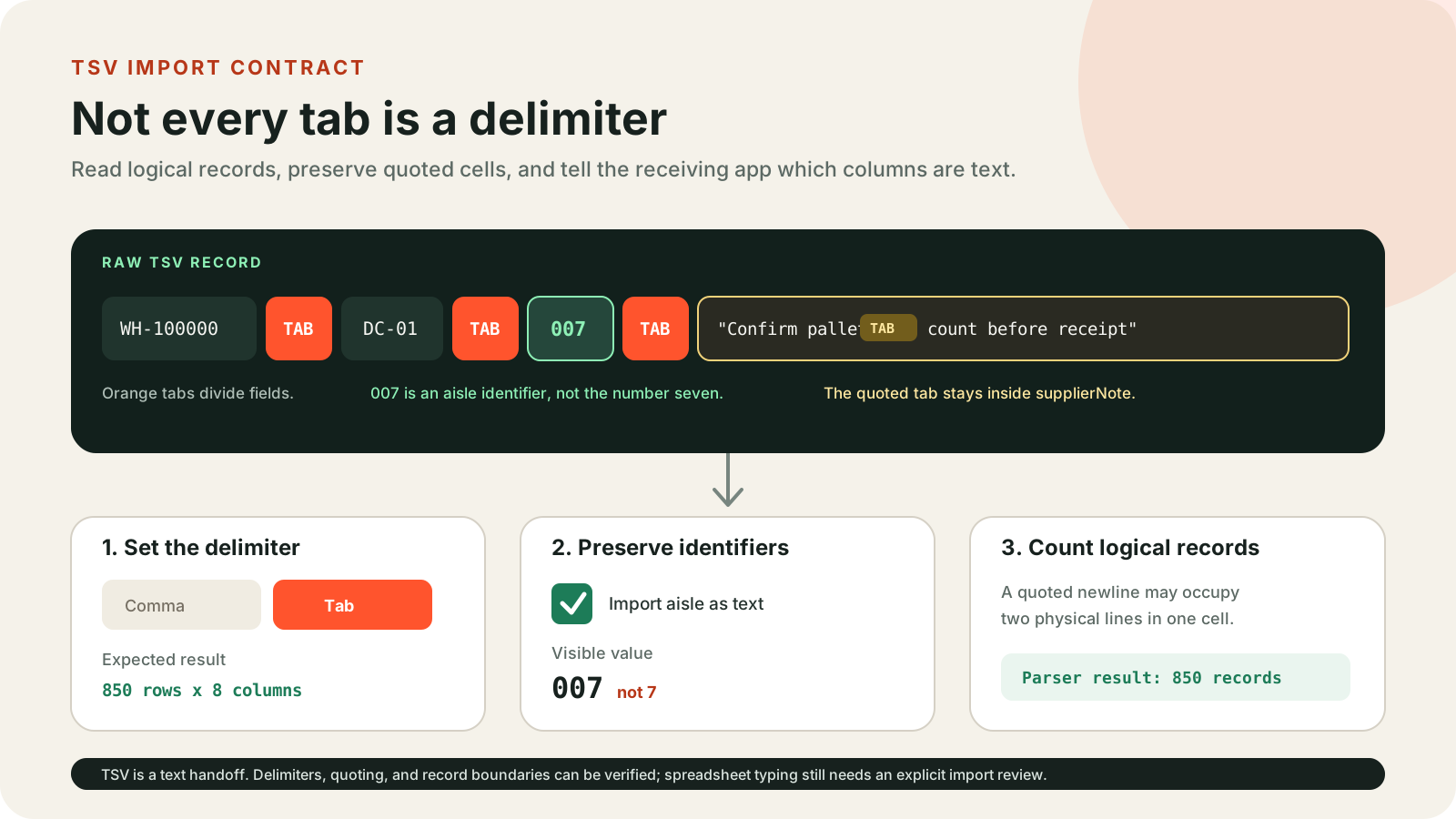
A tab inside a JSON string is not a separator chosen by the exporter; it is part of the cell value. The output quotes that cell so the row still has the right number of columns. Newlines can also exist inside quoted cells, which means a raw line count is not always the same thing as a record count.
If your receiver cannot handle quoted tabs or multiline cells, reshape the value first. For example, replace tabs with spaces or project a shorter note field before exporting.
A practical review is to open the saved file in a plain text editor before importing it. Turn on visible whitespace if your editor supports it. You should see one tab between ordinary cells, quotes around any cell that contains a tab or newline, and the same number of logical fields in each record.
TSV does not remove spreadsheet coercion
TSV avoids comma ambiguity, but it does not stop a spreadsheet from converting dates, long IDs, or formula-like text. Treat cells beginning with =, +, -, @, tabs, or newlines as spreadsheet-sensitive; a value such as @danger or -42 may be apostrophe-prefixed for safer import.
That protection is a safety behavior, not a guarantee that the receiving app will preserve every value exactly. Review the imported table, especially identifier, amount, and date columns.
Keep going
Choose a JSON export format
Compare CSV, TSV, YAML, TOML, XML, .properties, Markdown, HTML table, and NDJSON exports from JSON before choosing the right guide.

Convert nested JSON to CSV without uploading it
Export nested JSON to CSV locally, shape nested fields into deliberate columns, and avoid spreadsheet surprises with IDs, nulls, and formula-like values.
Convert JSON to a Markdown table
Create Markdown tables from JSON arrays for READMEs, issues, and documentation while handling nested fields, pipes, and multiline cells.
Convert JSON to an HTML table
Export a JSON array as a readable HTML table report and review saved-artifact behavior, escaping, sorting, and mapping limits.
How to use JQ: practical JSON filter examples
Copyable JQ examples for extracting fields, filtering arrays, reshaping objects, and grouping JSON records.