 JSON All-in-One

Convert JSON to XML with a clear mapping
Converting JSON to XML means choosing a mapping; the two data models do not line up automatically. Before the result is useful, it needs a document root, legal element names, escaped text, and sometimes details that exist only in the receiver's schema.
The examples stay with the awkward bits: what to call fallback elements, how to map arrays, when text is escaped, and which schema rules the partner system expects.
Know the mapping before export
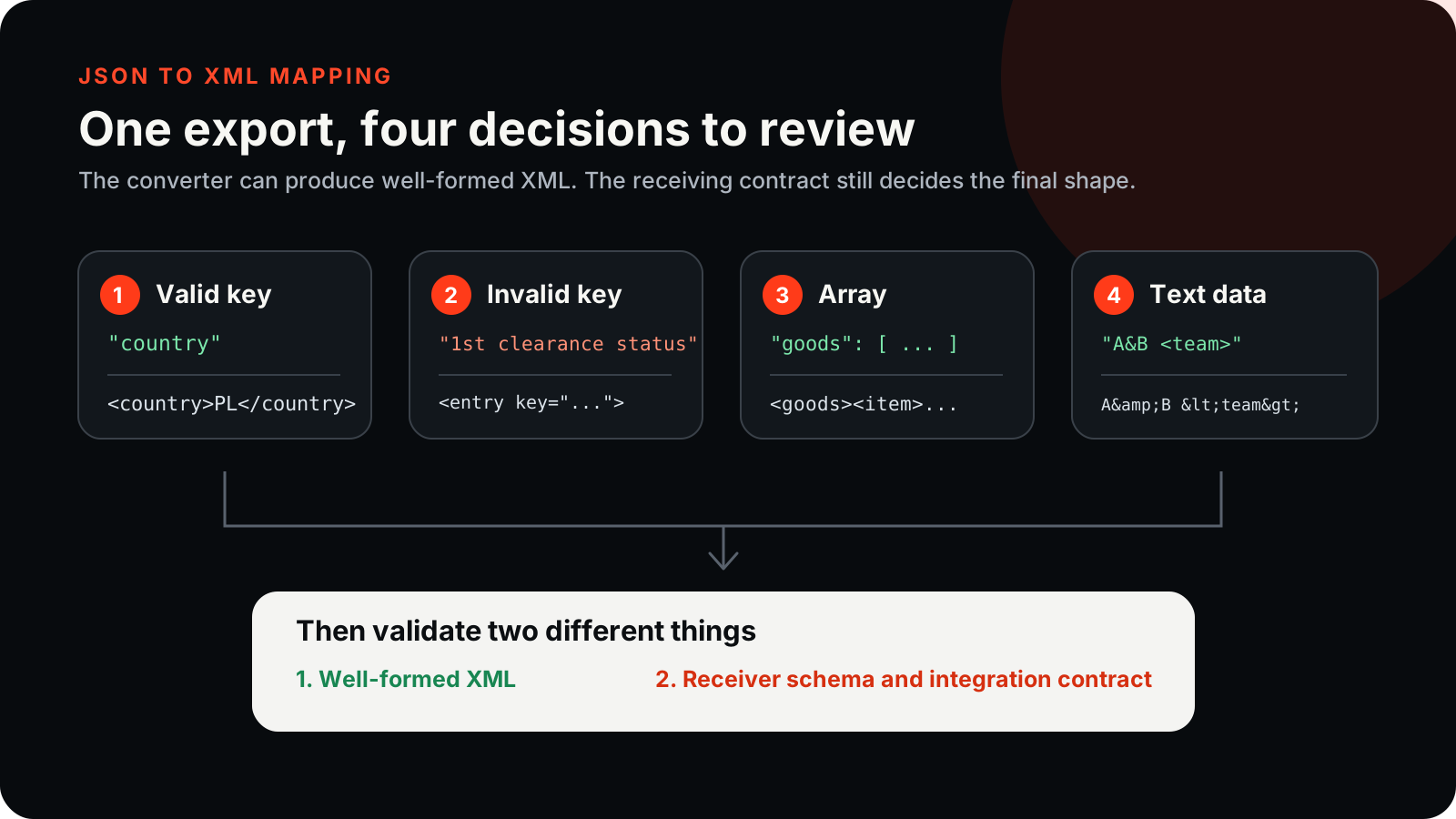
With a valid XML name, an object key becomes a nested element. Array entries repeat as item elements below their parent. Scalars and null become element text. An invalid XML key takes a different route: an entry element carries the original key in an attribute.
That fallback is important. A JSON key such as 1bad or bad key cannot simply become <1bad> or <bad key> in well-formed XML.

Copyable XML output
{
  "valid": {
    "title": "A&B report",
    "bad key": null,
    "arr": [true, false, 3]
  },
  "1bad": "ok"
}<?xml version="1.0" encoding="UTF-8"?>
<root>
<valid>
<title>A&B report</title>
<entry key="bad key">null</entry>
<arr>
<item>true</item>
<item>false</item>
<item>3</item>
</arr>
</valid>
<entry key="1bad">ok</entry>
</root>
Export XML
- Open the JSON source in JSON All-in-One.
- Shape the source if only one subtree should become the XML document.
- Choose Export, then XML.
- Review the generated root element and fallback
entry keyelements. - Validate well-formedness with a separate XML parser before sending the file to the receiving system.
Review element names deliberately
XML naming rules are stricter than JSON object keys. A JSON key can contain spaces, punctuation, start with a number, or repeat patterns that are awkward in XML. The fallback entry key shape keeps the original key visible, but it may not match a partner system that expects a named element.
Compare at least one invalid-name key and one valid-name key side by side before you send XML to a receiver. That makes the mapping visible instead of leaving the first rejection to happen in a partner system.
Well-formed XML is not schema compliance
A parser can accept an XML document that your partner, enterprise system, or XSD rejects. XML schemas may require attributes instead of child elements, specific namespaces, ordered children, different root names, or a particular representation for nulls.
The JSON source usually does not contain those XML-only decisions. If the receiver has a schema, compare the generated document against that schema and adjust the JSON shape or use a purpose-built mapping step.
Before sending the file, check the root name, array item names, null representation, text escaping, and any attributes required by the receiving system. Validate against the receiver's schema when one is provided.
Arrays and nulls need special review
Repeated array items are easy for humans to read, but the receiver may expect a different element name than item. Null is visible as text in the output above, but some XML contracts prefer an omitted element, an empty element, or a namespaced nil attribute.
Keep the original JSON when structure, types, or precision matter. Converting to XML does not guarantee that a later conversion back to JSON will reconstruct the same data.
If the handoff is for a partner API, ask for a minimal accepted XML example from that partner. Compare it against the exported XML before you send real data. The closer the fixture is to the receiver's contract, the fewer surprises you will have with names, arrays, and nulls.
Keep going
Choose a JSON export format
Compare CSV, TSV, YAML, TOML, XML, .properties, Markdown, HTML table, and NDJSON exports from JSON before choosing the right guide.
Convert nested JSON to CSV without uploading it
Export nested JSON to CSV locally, shape nested fields into deliberate columns, and avoid spreadsheet surprises with IDs, nulls, and formula-like values.
Convert JSON to YAML for readable configuration
Export JSON to YAML locally with clear examples for nesting, quoted strings, booleans, nulls, and configuration handoff limits.
How to use JQ: practical JSON filter examples
Copyable JQ examples for extracting fields, filtering arrays, reshaping objects, and grouping JSON records.