 JSON All-in-One

Generate C# models from JSON
A JSON-to-C# class generator is handy when you are staring at a real API response and need model code to start a .NET integration. JSON All-in-One can generate C# record-style or class-style models from a local JSON sample.
The generated models give your .NET integration a starting shape. Add the serializer settings and custom converters your application needs, then check how the sample data is read into those models.
Use a response that exposes C# choices
This billing sample is deliberately awkward: nullable fields, snake_case JSON keys, a precise decimal amount, a large invoice number, and nested line items. A bare class shell would hide the C# choices we need to make about names and numbers.
The JSON keeps invoice keys in snake_case, while the generated C# model uses PascalCase properties. Deserialization therefore needs a naming policy that joins those two conventions.
{
  "invoice_id": "inv_9001",
  "invoice_number": 9007199254740993,
  "total": 245.75,
  "paid_at": "2026-09-04T14:30:00Z",
  "customer": { "display_name": "Northwind Labs", "tax_id": null },
  "lines": [
    { "sku": "api-basic", "quantity": 3, "unit_price": 49.25 },
    { "sku": "support", "quantity": 1, "unit_price": 98.00 }
  ]
}
Read the generated model shape
C# exposes Record and Class style. Records with init-style properties can be a good default for immutable response data. Settable classes can be easier in projects that rely on older serializers or framework conventions.
The excerpt below assumes the decimal policy was selected for money-like values and shows the kind of review questions that matter: nullable reference types, decimal versus double, and a large invoice number. If your generated model uses different property names or attributes, follow the generated file and adjust the serializer setup around it.
namespace Example.Billing;

using System;
using System.Collections.Generic;

public record InvoiceResponse
{
    public string InvoiceId { get; init; }
    public long InvoiceNumber { get; init; }
    public decimal Total { get; init; }
    public DateTimeOffset PaidAt { get; init; }
    public Customer Customer { get; init; }
    public List<Line> Lines { get; init; }
}

public record Customer
{
    public string DisplayName { get; init; }
    public object? TaxId { get; init; }
}

public record Line
{
    public string Sku { get; init; }
    public long Quantity { get; init; }
    public decimal UnitPrice { get; init; }
}
Separate model names from JSON names
A C# property named InvoiceId may correspond to JSON key invoice_id. Check whether your generated output includes JSON-name attributes. If it does not, configure the serializer naming policy or add mapping code instead of assuming the names will bind automatically.
The handwritten example uses System.Text.Json on .NET 8 or later. SnakeCaseLower maps names such as InvoiceId to invoice_id; case-insensitive matching alone would not remove the underscore. For older .NET versions, use explicit JsonPropertyName attributes or a custom naming policy.
using System.Text.Json;

var options = new JsonSerializerOptions
{
    PropertyNamingPolicy = JsonNamingPolicy.SnakeCaseLower
};

InvoiceResponse? invoice = JsonSerializer.Deserialize<InvoiceResponse>(jsonText, options);
Console.WriteLine(invoice?.Customer.DisplayName);
Review nullable and numeric policies
The C# target supports native or string date/time, native or BigInteger integer policy, native double or decimal decimal policy, and native object or string unknown JSON values. Those options change how the generated code communicates risk.
For money-like examples, decimal is usually easier to justify than double, but the deserializer still has to read the value correctly. For BigInteger, remember that serializer support may need custom configuration.
| Concern | C# option | Caveat |
|---|---|---|
| Missing or null customer fields | Nullable reference/value types | Sample inference cannot prove future API behavior. |
| Money-like decimal | decimal or double | Use decimal with matching serializer behavior. |
| Large invoice number | long or BigInteger | Custom JSON converters may be needed. |
| Unknown metadata | object or string | Document how the consuming code reads it. |
Workflow checklist
- Generate C# from a representative source that includes nulls and nested arrays.
- Choose Record or Class based on the .NET project style.
- Set the namespace and review generated filenames.
- Check nullable annotations,
decimal,BigInteger, and date/time policy. - Compile a minimal project and deserialize the exact fixture only after serializer assumptions are explicit.
What the generator does not configure for you
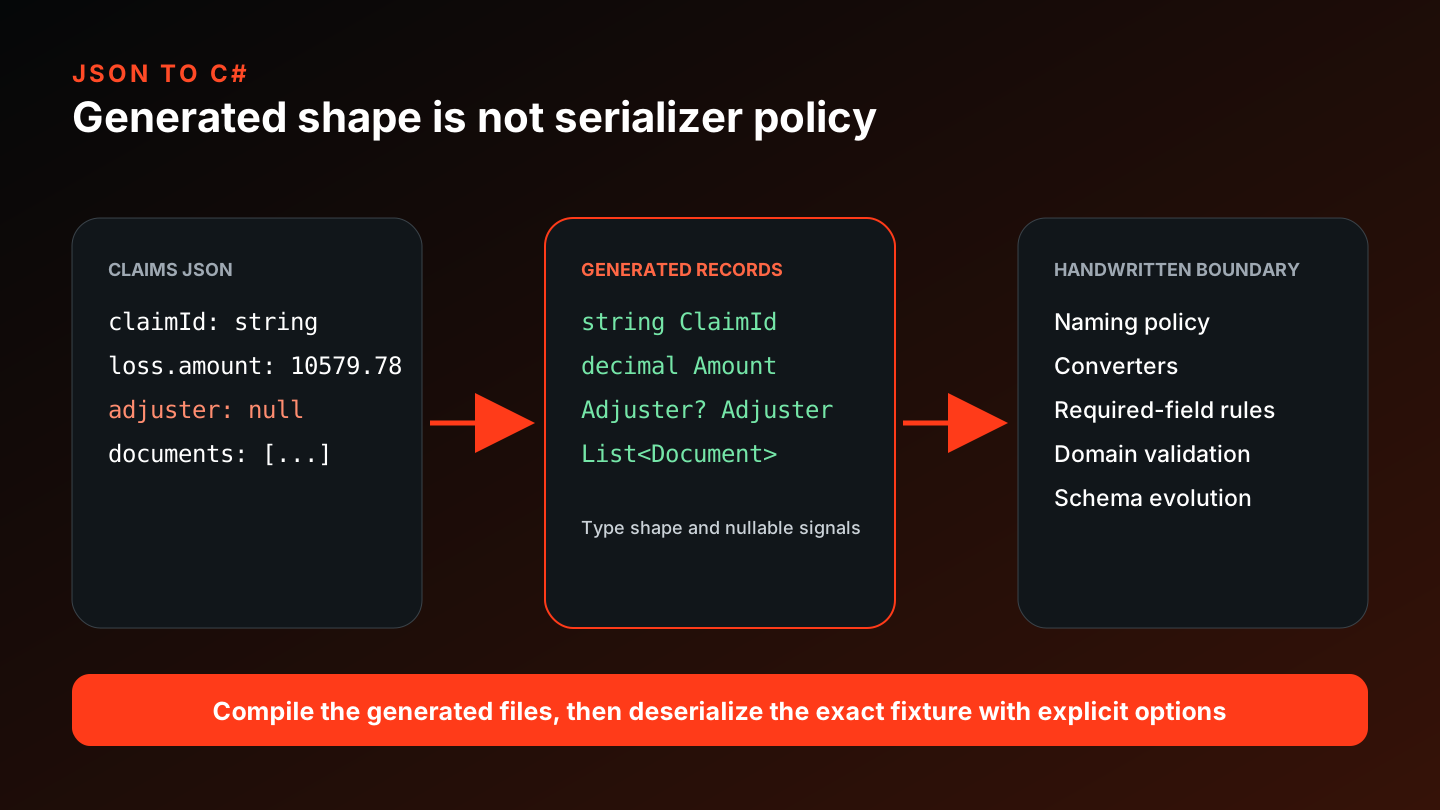
The generator can give you model code; it does not know your domain invariants, naming policy, converter stack, or validation layer. Keep those decisions visible so the reader does not paste a sample-derived type into production unchecked.
Compilation only tells you that the model is legal C#. Try deserializing the fixture as well: serializer settings decide whether snake_case keys and special numeric values bind correctly.
Generated models and serializer responsibilities
Keep going
Generate code from JSON
Choose a JSON-to-code target, understand what sample-derived models can prove, and move from one JSON shape into TypeScript, Python, Java, Kotlin, C#, Go, or Rust.

Generate JSON Schema from sample JSON
Turn observed JSON samples into a starting JSON Schema, then review the inferred types, required fields, nulls, and limits.
Why large JSON numbers change in JavaScript
Reproduce JavaScript number rounding, distinguish JSON number tokens from runtime numbers, and choose safer handoff representations.
Generate Java classes and records from JSON
Generate Java POJOs, classes, or records from JSON, review Jackson annotations and numeric/date choices, and keep handwritten application glue separate.