 JSON All-in-One

Why large JSON numbers change in JavaScript
JSON syntax can contain a numeric token such as 9007199254740993. The problem appears when that token is parsed into a runtime type that cannot represent it exactly.
In JavaScript, ordinary numbers are IEEE 754 double-precision values. Integers above Number.MAX_SAFE_INTEGER can round when you use JSON.parse, so identifiers and high-precision decimals need deliberate handling.
Reproduce the rounding
This is the smallest useful demonstration. The JSON text contains 9007199254740993, but JavaScript's ordinary parsed number prints as 9007199254740992 in many environments.
That does not mean JSON itself has JavaScript's safe-integer limit. It means the chosen parser/runtime representation lost information after reading the JSON token.
const text = '{"id":9007199254740993,"quotedId":"9007199254740993"}';
const parsed = JSON.parse(text);
console.log(parsed.id);       // 9007199254740992
console.log(parsed.quotedId); // "9007199254740993"JSON token versus runtime type
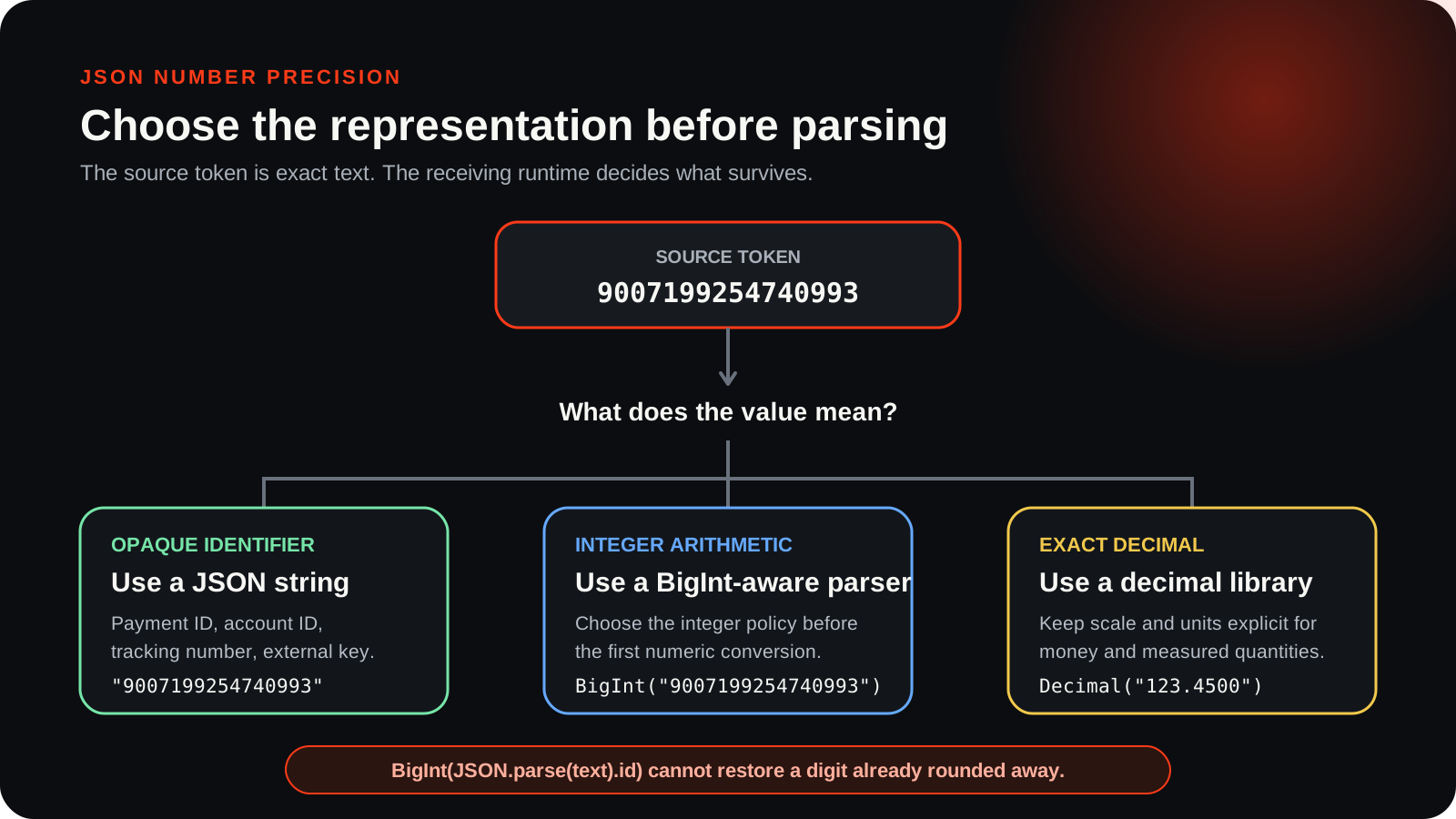
A JSON number token is text in a JSON document. A JavaScript Number is a runtime value with finite precision. A JavaScript BigInt can represent large integers, but JSON.parse does not automatically return BigInt for JSON numbers.
Strings are often the safest representation for identifiers, account numbers, card-like references, and external IDs. If a value will never be used for arithmetic, storing it as a JSON string can prevent accidental numeric conversion in browsers, spreadsheets, and databases.
| Source value | What to watch | Safer handoff |
|---|---|---|
| 9007199254740993 | May round as JavaScript Number | String for identifiers; BigInt-aware parser for integer math |
| 1234567890.123456789 | Decimal precision depends on consumer | String or decimal library when exact cents/units matter |
| "9007199254740993" | Preserved as text, not a number | Parse intentionally only where needed |
Inspect before transforming
JSON All-in-One's JSONC parser and structured rendering paths are designed to keep exact raw number literals visible in core viewing scenarios. That is useful for inspection: you can confirm the original source token before another tool rounds it.
Inspecting the source token is only the first check. Arithmetic, JQ transformations, code generation, spreadsheet import, CSV export, and external consumers can handle numbers differently. Preserving the token in a viewer does not make later calculations arbitrary-precision.
{
  "unsafeNumericId": 9007199254740993,
  "safeTextId": "9007199254740993",
  "decimalAmount": 1234567890.123456789
}Choose the downstream representation
If the field is an identifier, prefer text. If it is an integer used in arithmetic, use a language and parser path that intentionally maps it to BigInt or a big-integer type. If it is a decimal amount, use a decimal type or string-to-decimal codec in the receiving application.
Generated code can help document a likely type, but sample inference is not the same as a domain contract. If a generated model chooses a numeric type, review whether the real API can exceed that type's safe range.
Checklist for exact values
- Is this value an identifier or a quantity?
- Will JavaScript, a spreadsheet, or a database parse it before you see it?
- Does the receiving language have a safe integer, BigInt, or decimal type?
- Should the field be quoted in JSON to prevent accidental numeric conversion?
- Have you tested the exact operation, not just the viewer display?
Next step
Inspect the original numeric values first, then choose a handoff format. If you are exporting tabular data, read Convert nested JSON to CSV before opening the file in a spreadsheet. If you are generating models, review Generate JSON Schema first.
Keep going
Convert nested JSON to CSV without uploading it
Export nested JSON to CSV locally, shape nested fields into deliberate columns, and avoid spreadsheet surprises with IDs, nulls, and formula-like values.

Generate JSON Schema from sample JSON
Turn observed JSON samples into a starting JSON Schema, then review the inferred types, required fields, nulls, and limits.
Generate TypeScript types from JSON
Turn a representative JSON response into TypeScript interfaces or classes, then review optional fields, nulls, arrays, dates, and numeric policy before using the types.
Compare JSON files and understand the changes
Compare two JSON files, find added, removed, and changed paths, and understand how array order affects the diff.