# Open GitHub raw JSONC in Chrome
[Canonical HTML page](https://json-all-in-one.dev/en/guides/open-github-raw-jsonc/)
> Open a commented JSON file from GitHub raw in Chrome. See what JSONC, text/plain, and a sandbox CSP mean, with a measured browser-viewer example.
Yes, JSON All-in-One can open the [GitHub raw keymap tested here](https://raw.githubusercontent.com/dol/zed-netbeans-keymap/refs/heads/main/keymap.json) as an interactive JSONC tree in Chrome. In our October 8, 2026 test, the extension displayed its comments and let us collapse and reopen a nested bindings object. Install [JSON All-in-One for Chrome](https://chromewebstore.google.com/detail/json-all-in-one-json-json/gjcjgbhocdlnhnmiddkhkiobnjaffmin?utm_source=json-all-in-one&utm_medium=referral&utm_campaign=landing) or [Edge](https://microsoftedge.microsoft.com/addons/detail/baelbbgafaipmjjcnkeppjjmmojlpech?utm_source=json-all-in-one&utm_medium=referral&utm_campaign=landing) to try the source yourself.
The interesting part is not the filename. It ends in `.json`, but the response contains `//` comments, arrives as `text/plain`, and includes a sandbox Content Security Policy. Those details explain why a raw URL can be less straightforward than a small, strict JSON API response.
## Try the actual raw URL
Open the linked keymap in Chrome with JSON All-in-One enabled. In the tested version, it moved into the extension's own top-level viewer rather than asking the remote page to run the viewer UI. You should see the leading comment lines, then the root array and its `bindings` objects. Collapse the first `bindings` object and reopen it to check that you have a working tree, not just highlighted raw text.
This is a branch URL, not an immutable fixture. The publisher can change its bytes or headers later. If your result differs, check the response and extension version before treating it as a regression. Our [saved response details and run data](https://json-all-in-one.dev/benchmarks/sandboxed-remote-2026-10-08/PUBLIC_REPORT.md) record the exact October test.
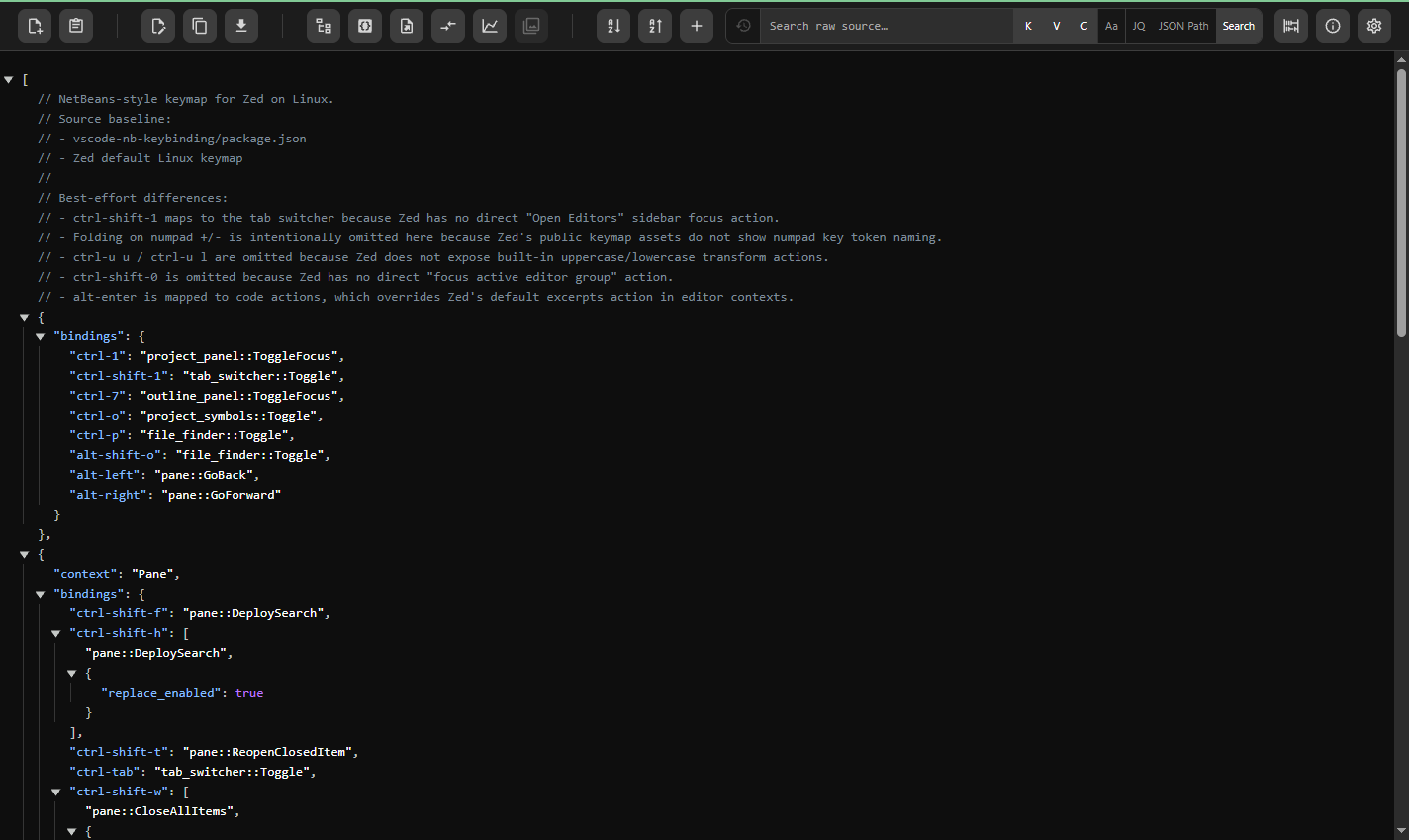
The tested GitHub raw JSONC keymap in JSON All-in-One's packaged viewer, showing preserved comments and an expanded bindings object.
## A .json name does not make the body strict JSON
Strict JSON rejects comments. This keymap includes `//` lines, so a parser that insists on strict JSON can reasonably leave it raw or report an error. JSONC-aware inspection treats those comments as source annotations rather than values. That does not mean JSON All-in-One accepts every JSON5 feature or that a later strict-JSON export will retain comments.
The live response also declared `text/plain; charset=utf-8` with `X-Content-Type-Options: nosniff`. A viewer that only activates for `application/json` may never reach its JSON parser on this route. Check syntax and response headers separately when diagnosing a raw tab. For the format distinction and safe handoff, see [JSON with comments](https://json-all-in-one.dev/en/guides/json-with-comments/) and [JQ with JSONC](https://json-all-in-one.dev/en/guides/jq-jsonc/).
### Observed response headers, October 8, 2026
```text
Content-Type: text/plain; charset=utf-8
X-Content-Type-Options: nosniff
Content-Security-Policy: default-src 'none'; style-src 'unsafe-inline'; sandbox
```
## What happened in the browser test
We tested the live URL at default settings, then served a strict-JSON version of the same data locally as `text/plain`, with and without the GitHub CSP. A working tree required a real collapse and re-expand action. Raw means no extension tree within the observation window; it does not mean the browser crashed. Each table cell is one qualified attempt, not a performance sample.
JSON Formatter and JSONVue rendered the strict-JSON control with the sandbox CSP. Their raw result on the live page is therefore not proof that sandboxing alone blocks them. JSON Viewer Pro stayed raw for the `text/plain` controls; a separate `application/json` control rendered without CSP but stayed raw with CSP. These controls narrow the explanation without proving one cause for every product.
| Chrome extension | Live GitHub JSONC | Strict JSON, text/plain, same CSP |
| --- | --- | --- |
| JSON All-in-One 1.0.9 | Interactive tree | Interactive tree |
| JSON Formatter 0.10.2 | Raw | Interactive tree |
| JSONVue 0.2.3 | Raw | Interactive tree |
| JSON Viewer Pro 1.0.7 | Raw | Raw |
## What the sandbox changes, and what it does not
The remote response's CSP includes `sandbox`, which restricts what that page can run. JSON All-in-One's tested route opened its own packaged top-level viewer for this source; it did not remove GitHub's response policy or turn off a browser security setting. The no-CSP local control instead used the embedded viewer at the source URL.
That is a useful path for this public source, not a promise about every server. Authenticated URLs, changing GitHub content, redirects, different MIME types, other policies, and future extension versions need their own checks. If a JSON URL remains raw, start with the actual response headers and syntax rather than assuming the CSP is the sole cause.
## Reproduce the observation, then work with the data
- Open the exact GitHub raw URL and confirm that the response still contains comments.
- Check the tree: expand a bindings object, collapse it, and reopen it. A colored raw page is a different outcome.
- Keep the original source for inspection. If another program needs strict JSON, prepare and verify a separate cleaned output rather than deleting comment-looking text with a regular expression.
- Read the [public method, exact response hash, controls, and caveats](https://json-all-in-one.dev/benchmarks/sandboxed-remote-2026-10-08/PUBLIC_REPORT.md) before generalizing the result.
## Related guides
- [JSON with comments: working with JSONC files](https://json-all-in-one.dev/en/guides/json-with-comments/): Understand why strict JSON rejects comments, how JSONC differs, and how to inspect commented configuration safely.
- [How to use jq with JSONC](https://json-all-in-one.dev/en/guides/jq-jsonc/): Standard jq cannot read JSONC directly. Learn which JSONC queries work in JSON All-in-One, when the array fast path applies, and how to convert JSONC for jq in a shell.
- [How to open a JSON file](https://json-all-in-one.dev/en/guides/how-to-open-json-file/): Open a JSON file in a text editor, Chrome, or a structured viewer. If Chrome shows raw text, check the extension's local file URL permission.
- [Open large JSON files in Chrome](https://json-all-in-one.dev/en/guides/open-large-json-files/): A practical local workflow for inspecting large JSON files in Chrome while choosing operations that fit the data shape.
[Browse all JSON guides](https://json-all-in-one.dev/en/guides/)